Archive for the 'QuickTip Sundays' Tag

QuickTip Sundays: Get Firefox

By | July 06, 2008

Never mind that Firefox 3, the new browser, is so fast it runs circles around Internet Explorer 7 and Safari for the Mac (this after a long time of bloatware with Firefox 2), their website is the best I’ve ever seen at identifying exactly at getting people to download the browser. The navigation of the site has always been phenomenal (is there anything more straight forward than add-ins?), and this release, it just gets better.

The wins?

Detect who the user is in a hurry

Am I a Mac or a PC person?

No problem!

We’ll just look at the user agent provided by the browser and server, and we’ll detect the language and operating system. No choosing, just a small note that tells the user exactly who they are. This is a detail most websites completely miss (how many times do I have to see PC Software listed when I access Download.com?).

At the bottom of the page there’s content comparing Firefox vs. Safari, the native browser for the Mac I’m on. Brilliant!

How much does this cost?

It’s free! And they tell you it’s free! Download now! Operators standing by!

But what if I have the wrong language selected?

I would have listed some of the languages here (how many Japanese people will be able to translate Other Systems and Languages if their browser is set wrong?), but for the most part, selecting another platform or language is straight forward. The secondary page does it a great job listing the languages, but a poor job of translating the word “Download” into each language. Was someone, anyone paying attention?

 Comments | Comment

QuickTip Sundays: Ted – Ideas Worth Spreading

By | June 29, 2008

Use Rich Media With A Purpose

This is not a criticism — this is actually a compliment. Ted.com does an amazing job making Flash relevant with this page design, using large images are very prominent business and social leaders to create a very visual experience. Select an option on the left (say, technology), and the page reshuffles like a tag cloud to present new speakers. They could have built this using DHTML — the page still would have been fairly heavy — but it’s really aimed at an audience that already has a fat pipe to serve up this content.

Content can be ordered and sized by different faceted filters (woo hoo!), and if the visualization mode is too much for you, you can resort to a list view (how Web 1.0). You can even view the number of comments and times each was emailed to friends.

Another tip: it would be even cooler if the boxes could be dragged around and re-ordered to see certain topics large.

 Comments | Comment

QuickTip Sundays: Airline Sites

By | June 22, 2008

If it’s an absolute requirement, it should be spelled out in plain language

So some of you have probably been following my misadventures with United Airlines. After a few calls, they were awesome at correcting a airline ticket where I didn’t include the full name of the passenger (she has an Anglicized name that also appears with her Chinese name on her passport), and I didn’t find out until later that I needed to include the full name.

Not to throw just United Airlines under the bus (pun intended), but most of the other sites didn’t point out the the following requirement: that whatever name was listed, it should be exactly the name on any identification. This isn’t necessarily the airlines’ fault — all of the airlines are following guidelines set forth after 9/11.

The issue for some of the sites is that this requirement isn’t obvious enough: if someone like me, who never reads the text on a site, misses this, I can’t imagine how many others have fallen prey. And with the frustration over customer service and airlines in general, passing the buck of the travel sites with the airline companies has become almost sport.

Here are a few screen shots from my favorite airlines:

Southwest Airlines

No indication.

American Airlines

Does indicate, but in legalspeak.

Delta Airlines

No indication, but does have an indication that you can refund the flight if there are changes within 24 hours of booking further down the page.

Orbitz

Perfect. Someone at the other sites needs to copy this exactly. An additional improvement would be to add a link to the polices for changing flights. They should have additional text that reads something to the effect “even in the event of a mispelling.”

Other Travel Sites

Expedia does cover this under the rules and restrictions, and on the screen where you have to enter a traveler, but not next to the text entry area (and the rule is actually covered up by a popup window. Travelocity is much like Orbitz, where the explaination text is right next to entering the name.

 Comments | Comment

QuickTip Sundays: Hulu

By | June 15, 2008

Where’s The Search Box?

Hulu‘s a pretty good site — lots of video from companies that want some kind of control over the content, which is much more than YouTube is giving them. The site’s is version 1.0, so the interface feels a bit clunky. Most importantly, where’s the search box?

I made the screen capture small without a highlight for the primary reason that if you are on a content-heavy site, that search box better be easy to find. Like Google easy to find. Like YouTube easy to find. Like News.com easy to find.

Can you find it?

 Comments | Comment

QuickTip Sundays: Kelley Blue Book

By | June 08, 2008

Search Panels Should Be Designed With Economy

In the upper left corner, there’s a huge search panel that contains all kinds of ways of filtering for car listings. While I’m all for showing as many options as possible. This area could be reduced by at least 50 percent by adding drop down menus and AJAX-style selection to get the user where they want to go. Some of the contextual navigation (finding a dealer, finding a car) could be mixed in differently.

Designing Above The Fold

Kelley Blue Book is an advertising-driven site, so the value isn’t only their ratings for cars, but driving users to the editorial content on the site. Most of the interesting content is buried low on the home page, and because most users are going to the site for finding a used car price range, they will never see the article content. I would actually suggest that searching for a car price might be placed below some editorial content (but screen centric) to see how it tests in A-B testing.

 Comments | Comment

QuickTip Sundays: 24 Hour Fitness

By | June 01, 2008

I joined a gym, and did it online. I like the 24 Hour Fitness site because I was able to join online and not deal with any pesky salespeople trying to sell me a plan I didn’t want, and it was a fairly easy process to join. I need notice a couple of items I would change if I were in charge of their website:

Personalization
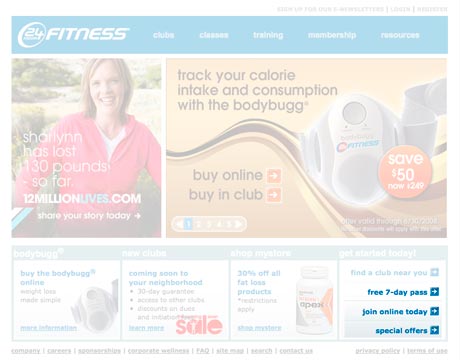
I came in as a member, and those links showed up. They should be replaced with links that are appropriate to me as an audience. Off that page, I would also make getting to the online store more obvious.

Non-Standard Credit Card And Information Forms
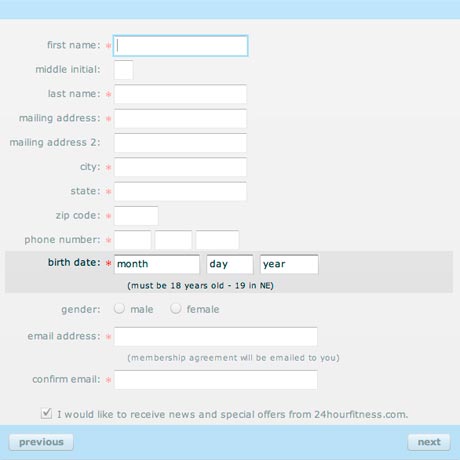
This is the join form, but this also appears in the credit card form — the form required you to enter your month (May, November, September) instead of selecting it from a drop down menu or entering a number. It might seem clever, but every other form of this type I’ve seen has been entering a date as numbers and not as a text item.

You have to really do things people expect, and this is outside the lines. If 80 percent of the forms out there require thing, there better be a really good reason to do it different, and there really isn’t a good reason to do it different here. I wonder: did they do any usability testing?

One note: If you are designing forms for an international audience, the format of the date for most countries is day, month, and year.

 Comments | Comment

QuickTip Sundays: Yahoo Music Unlimited

By | May 25, 2008

I’ve been trying to install Yahoo! Music Unlimited on a friend’s computer for quite a while now, and finally, we just gave up. We found out that Yahoo! was discontinuing service soon to Canadians (the friend is Canadian), and figured it was time to move to Rhapsody, even though Rhapsody’s a few more dollars more. The point is, it was a rather frustrating experience, and part of the reason why Yahoo! is doing poorly — most of their services are rather frustrating.

There are no screen shots because I couldn’t install the software. Additionaly, there was no clear indication that the service was going to be discontinued for her.

Here’s what I would have done to make the service easier:

Tested the software on many platforms with many states of other application installs. One of the mistakes that many Windows developers make is they never test if for a typical install — which is when users install tons of applications, many of them of suspect quality, before installing your application. The developers always insist on a clean install of Windows, and how many of us have a clean install?

Put a “download software here” link somewhere on the site. If you go to Yahoo Music Unlimited now, there’s no explanation of what software you need to make it work — they just have a bunch of links to try this software now, which is entertaining, because they are about to kill the offering completely. The answer is that you have to download the Yahoo Music Jukebox, which I assume is a fine piece of software, except…

If the software doesn’t install, there should be an easy way to contact customer support for help. There was no install log, no click here if the software isn’t installing. Finding any answers at all on the Yahoo! website is a frustrating experience, and it took me upwards of two days to figure out that I should be contacting customer support. Additionally, there are seemingly three or four separate customer support contact screens, further confusing the issue.

Browser experiences are hard enough, but especially with applications, usability of said application is very important, especially when it’s an install of a paid service. Open source or shareware software, I could see less support — however, this is Yahoo, and the assumption is they are making some money off of this.

 Comments | Comment

QuickTip Sundays: Errors And Buttons At Virgin America

By | May 18, 2008

One of the forgotten facets of User Experience is that User Experience is everything on the website — the writing, the usability. It’s also if the site works from a functionality standpoint, and if there are system issues that don’t allow the user to complete a task, that’s a poor User Experience.

I ran into an issue at the Virgin America site — I tried to upgrade a seat from a premium to first class at check-in (which, by the way, is only a $50 upgrade on the day of the flight). My friends have been recommending the airline, so I decided to give it a try, because the price wasn’t much different than Alaska.

The issues were:

  • The price was wrong
  • The payment screen didn’t work well because it had issues automatically populating information if I entered the information wrong and showed a system error
  • When I submitted payment, the site timed out

System issues like this are just as frustrating to the user as poor usability; users don’t know why things are going wrong, and sometimes assume that it’s something they did. I don’t know how many times I’ve seen during usability testing where a user would hit reset when hitting a javascript popup dialog.

Testing of a site is especially important if the site is an e-commerce site, like Virgin America, because it directly hits the bottom line. It’s all about ROI, baby.

The one usability issue I saw with the site was the color of the buttons (actually, the lack of color):

That continue button is really hard to spot. I would have made it dark gray (all the positives that color), to move the user along). The placement of the buttons was correct (positive to the right).

I do know that this site was designed by an agency (they were probably built the site also, and most agencies don’t have a lot of technical talent). Sometimes the look of a site should not take precidence over the usability of the site, especially when it comes to buttons.

On a good note, Virgin America honored the upgrade and did a wonderful job with their customer service, and the website had one important link — a mail to — so I could email the issue to their web team. I commend them for doing things the right way!

 Comments | Comment

QuickTip Sundays: Metroblogging

By | May 11, 2008

QuickTip: Label the not-so-obvious, giving some kind of indicator what it is with help text and or a label.

Metroblogging is a great site — localized blogs in 54 cities around the world, and they have a map that shows where the cities are. It would be great if i actually knew what the cities were if I hovered over them.

That’s really easy to fix: just add a label next to the city ball, and this would become a much, more usable Flash map.

Even with icons, there should always be some kind of label that indicates what the item is. Users don’t want to have to guess what it is, and even obvious items like folder items aren’t so obvious.

 Comments | Comment


About Usability Counts

Patrick NeemanPatrick Neeman is Director of User Experience at Jobvite, a social recruiting platform and runs both the UX Drinking Game and Startup Drinking Game | More | Contact

Subscribe to the RSS Feed Subscribe to the Twitter Feed Connect on LinkedIn

The UX Career Guide and
UX Resume Bootcamp

Need advice to get the UX job you love?
The Usability Counts UX Resume Template and Career Guide offers a wealth of information about shaping your user experience career. I'm also involved in an event to help UX Designers strengthen their resumes, the Jobvite UX Resume and Portfolio Bootcamp.