subscribe RSS Feed Twitter

QuickTip Sundays: Yelp.com

I’m a huge fan of Yelp.com because it allows me to be snarky in reviews, and generally the audience is pretty knowledgable about places. I’m not a fan, though, of their Information Architecture.

What ever you do, make navigation options obvious

It didn’t occur to me until a year and a half after using the site (really, a year and a half!) that messaging was connecting me to my internal email or in box at Yelp. Now, I’m a fan of cute, and it works on some sites, but not on most, especially a social networking review site. They really need to name it something obvious like InBox or Mail, because users don’t want to have to search for basic functions. It would really nice if there were a constant reminder of how many unread messages I had.

Talk is also a bit esoteric (I would have used Message Board or Forum, and there’s plenty of room).

I wonder how many page views they gave up because Yelp users don’t realize there’s a message board on Yelp?


QuickTip Sundays: Digg.com

One of my pet peeves is when I click on a link, I get sent to page that asks me to sign in. Some sites require it, which I understand, but if they do require it, they should make the process as painless and obvious as possible. Digg.com requires a sign in when you submit a new link for obvious reasons: to validate you are an actual user, and to limit spam.

Keep the options in your face

The vast majority of people that come to the page are new users, but I would guess a good percentage are returning users without the cookie saved. Why ask them to go above when sign in can be placed in line right here? It would take up 50, maybe 60 pixels of vertical space, tops, which is more important than losing a user.

Keep the options obvious and limited

Additionally, where it says Top In All Topics, that encourages leakage, meaning users are going to click there when they can’t figure out how to sign in. Just about every usability test I’ve seen regarding web forms is that the more places the user has to click, the more places they are going to click. there are metrics that show the number of people leaving a page were directly related to the number of links on that page.

Keep the forms simple

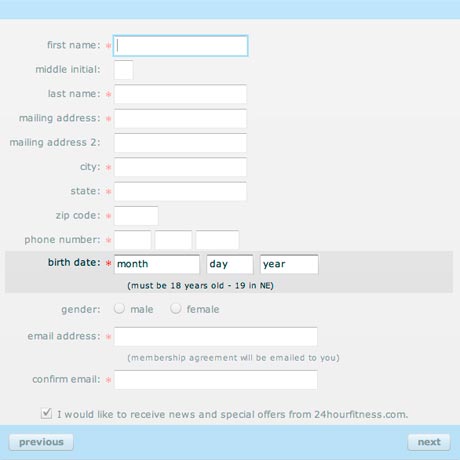
This registration form requires 12 pieces of information.

Twelve.

That’s great, if you are marketing cars, but this is an internet news site.

This is way too long, especially when the target audience is bloggers, most of whom don’t want to give up this much information. At the very most, digg should only be asking for the user name, email address, a password, and the CAPTCHA. Everything short of the gender and birthday could be assumed from the IP address to a certain amount of accuracy, and if the users really want to add those two, they can do that later or on a second screen.

When the user signs in or registers, return them to the page they were expecting

When I signed in, was I returned to a page where I could enter information about the article?

No.

I was returned to the home page. I have to return to the blog so auto-capture the article information. Not only does this irritate the user who clicked on the link to Digg, but it also irritates the blog owner (me), because I took the time to place a link on the article to promote my blog.


QuickTip Sundays: In-and-Out Burger And Expert Vs. Simple Interfaces

Can you spot the expert interface?

Can you spot the expert interface?

In-and-Out Burger is famous for its hidden menu — there’s a bunch of options you can ask for like grilled cheese that aren’t listed anywhere on their physical store menu which has the basics of basics: hamburger, cheeseburger, and double double.

This is an excellent example of a expert vs. simple interface. For the people that are new to In-and-Out, it couldn’t be easier, because the counter person asks if you want certain items, thus simplifying the process for the person ordering. If you go there more often and are an expert at ordering what you want at the restaurant, you’ll know that you can ask for extra pickles (which I do), or extra cheese, or even ketchup and mustard instead of the sauce.

This is an important distinction, because this shows that they have the customer in mind: they hide all the hard interfaces to get what you want, and keep it simple for the customer. If the customer really wants to delve deep into ordering a more customized product i.e. a hamburger with what they want, they have to learn it as an expert, but they’ll get exactly what they want.

It’s the same as the Mac OS X interface, because under the hood, it’s really Free BSD, but all of the nasty command line issues are hidden for most users like me. If the user really wants to tweek it, they can learn Free BSD.

What are some expert vs. simple interfaces that you see outside of computer systems?


QuickTip Sundays: Southern California Edison

So I’m going to catch up on a few posts — I’ve been moving — and one of the complaints I had was Southern California Edison. I’m moving in their territory, from Anaheim to Long Beach, and yet I had to create a new user account and re-enter all my information at their moving site.

I not a big fan of the SCE site to begin with, and this obviously boggles the mind. You know who I am, you know where I’m moving from and where I’m moving to — how about making it easy for me?


QuickTip Sundays: Blog Layouts

I’m going to keep this one short — I was moving this weekend — but Smashing Magazine has interesting article about blog layouts and what the big boys are doing. Check it out here.

Note to Smashing Magazine: Blogs are picking fixed layouts because liquid layouts are a pain in the neck.


QuickTip Sundays: Who’s Your Audience?

  • Can you answer in less than 50 words who should be visiting your website?
  • Can you teach those 50 words to all of your team members?
  • Can you print those 50 words on a piece of paper (or multiple pieces of paper) and tape them to the wall, all over the place?

QuickTip Sundays: RSS Feed And Subscribing Via Email

I’ll be the very first to admit I do a lousy job highlighting RSS Feeds on this site, and I just got around to adding a subscribing via email function. Many sites do a wonderul job of it. The truth is that the vast majority of users still don’t know was an RSS Feed is (Hey Dave Winer, just because it’s called Really Simple Syndication doesn’t mean people know what syndication means).

So here are a few tips:

  • Add a subscribe via email function (which I’m going to add soon). Feedburner has a few options, and make the text simple, like what I wrote on this site.
  • Make the RSS Feed image big so people can find it (and i find those little feedburner images too small)
  • Add a link next to this called, “What’s this?” I’ll be adding a page explaining what RSS is, and most sites, especially sites with less sophisticated users, should add this.

QuickTip Sundays: Get Firefox

Never mind that Firefox 3, the new browser, is so fast it runs circles around Internet Explorer 7 and Safari for the Mac (this after a long time of bloatware with Firefox 2), their website is the best I’ve ever seen at identifying exactly at getting people to download the browser. The navigation of the site has always been phenomenal (is there anything more straight forward than add-ins?), and this release, it just gets better.

The wins?

Detect who the user is in a hurry

Am I a Mac or a PC person?

No problem!

We’ll just look at the user agent provided by the browser and server, and we’ll detect the language and operating system. No choosing, just a small note that tells the user exactly who they are. This is a detail most websites completely miss (how many times do I have to see PC Software listed when I access Download.com?).

At the bottom of the page there’s content comparing Firefox vs. Safari, the native browser for the Mac I’m on. Brilliant!

How much does this cost?

It’s free! And they tell you it’s free! Download now! Operators standing by!

But what if I have the wrong language selected?

I would have listed some of the languages here (how many Japanese people will be able to translate Other Systems and Languages if their browser is set wrong?), but for the most part, selecting another platform or language is straight forward. The secondary page does it a great job listing the languages, but a poor job of translating the word “Download” into each language. Was someone, anyone paying attention?


QuickTip Sundays: Ted - Ideas Worth Spreading

Use Rich Media With A Purpose

This is not a criticism — this is actually a compliment. Ted.com does an amazing job making Flash relevant with this page design, using large images are very prominent business and social leaders to create a very visual experience. Select an option on the left (say, technology), and the page reshuffles like a tag cloud to present new speakers. They could have built this using DHTML — the page still would have been fairly heavy — but it’s really aimed at an audience that already has a fat pipe to serve up this content.

Content can be ordered and sized by different faceted filters (woo hoo!), and if the visualization mode is too much for you, you can resort to a list view (how Web 1.0). You can even view the number of comments and times each was emailed to friends.

Another tip: it would be even cooler if the boxes could be dragged around and re-ordered to see certain topics large.


QuickTip Sundays: Airline Sites

If it’s an absolute requirement, it should be spelled out in plain language

So some of you have probably been following my misadventures with United Airlines. After a few calls, they were awesome at correcting a airline ticket where I didn’t include the full name of the passenger (she has an Anglicized name that also appears with her Chinese name on her passport), and I didn’t find out until later that I needed to include the full name.

Not to throw just United Airlines under the bus (pun intended), but most of the other sites didn’t point out the the following requirement: that whatever name was listed, it should be exactly the name on any identification. This isn’t necessarily the airlines’ fault — all of the airlines are following guidelines set forth after 9/11.

The issue for some of the sites is that this requirement isn’t obvious enough: if someone like me, who never reads the text on a site, misses this, I can’t imagine how many others have fallen prey. And with the frustration over customer service and airlines in general, passing the buck of the travel sites with the airline companies has become almost sport.

Here are a few screen shots from my favorite airlines:

Southwest Airlines

No indication.

American Airlines

Does indicate, but in legalspeak.

Delta Airlines

No indication, but does have an indication that you can refund the flight if there are changes within 24 hours of booking further down the page.

Orbitz

Perfect. Someone at the other sites needs to copy this exactly. An additional improvement would be to add a link to the polices for changing flights. They should have additional text that reads something to the effect “even in the event of a mispelling.”

Other Travel Sites

Expedia does cover this under the rules and restrictions, and on the screen where you have to enter a traveler, but not next to the text entry area (and the rule is actually covered up by a popup window. Travelocity is much like Orbitz, where the explaination text is right next to entering the name.